Jobber
Helping service providers win work faster with less effort


Problem
Service providers were spending a lot of their time with the back-and-forth to get customers scheduled in their calendar
Existing request forms didn't actually connect to their calendars, which made for time-consuming back-and-forth communication with clients. Our goal was to help service providers win more work effortlessly (or, while they sleep as we would say).
01
No calendar integration
Request forms weren't connected to scheduling (neither in Jobber or Google calendar), causing missed appointments and double-bookings.
02
Constant back-and-forth
Service providers and clients had to coordinate manually (over email, phone, or text) to confirm every job.
03
Lost revenue potential
Without self-serve booking, providers couldn't capture leads outside business hours or while in the field, which meant often losing to competitors.
Process
Scoping the MVP
During the initial stages, we translated sketches from ideation sessions into high-level concepts for both the set-up experience and client-facing booking. We tested these concepts early to gather feedback, see what resonated, and refine our direction.
We mapped the full booking flow early, designing with the future in mind so the experience could scale without requiring rework later.

MVP

Future
We launched the MVP with a single list view because it was quickest to implement. A split view offered a more appealing interface but would have significantly delayed our schedule.
Designing for clarity under constraints
Service listings needed to communicate a lot (e.g. title, description, pricing, duration) without overwhelming clients on smaller screens. I designed a selectable card component that handles truncation and scaling across screen sizes while keeping the most important details visible.

Refining through testing
Usability testing surfaced friction points across the client-facing booking flow, from label clarity (like how we communicated arrival windows), to how services were displayed. We ran preference testing on service display and refined language throughout, based on what resonated most.

We also addressed how providers and field workers would be notified once a job was booked, and how it appeared within their existing Jobber workflow.

Designs
Flexible scheduling settings for providers
I designed comprehensive scheduling preferences settings. This covered things like earliest availability, time between appointments, booking time slot intervals, and arrival windows, so providers had full control without overwhelming complexity.


The booking flow
The flow walks clients through from selecting services, choosing a date and arrival time, entering contact information, and reviewing before confirming their booking. We took a mobile-first approach, as a majority of existing Client Hub traffic was on mobile.

Notes
Scoping deliberately
Online Booking touched a huge surface area. Every service provider has a different setup, from solo operators to multi-location franchises. We made deliberate calls about what to ship first and what to sequence as fast follows, rather than try to solve every use case.
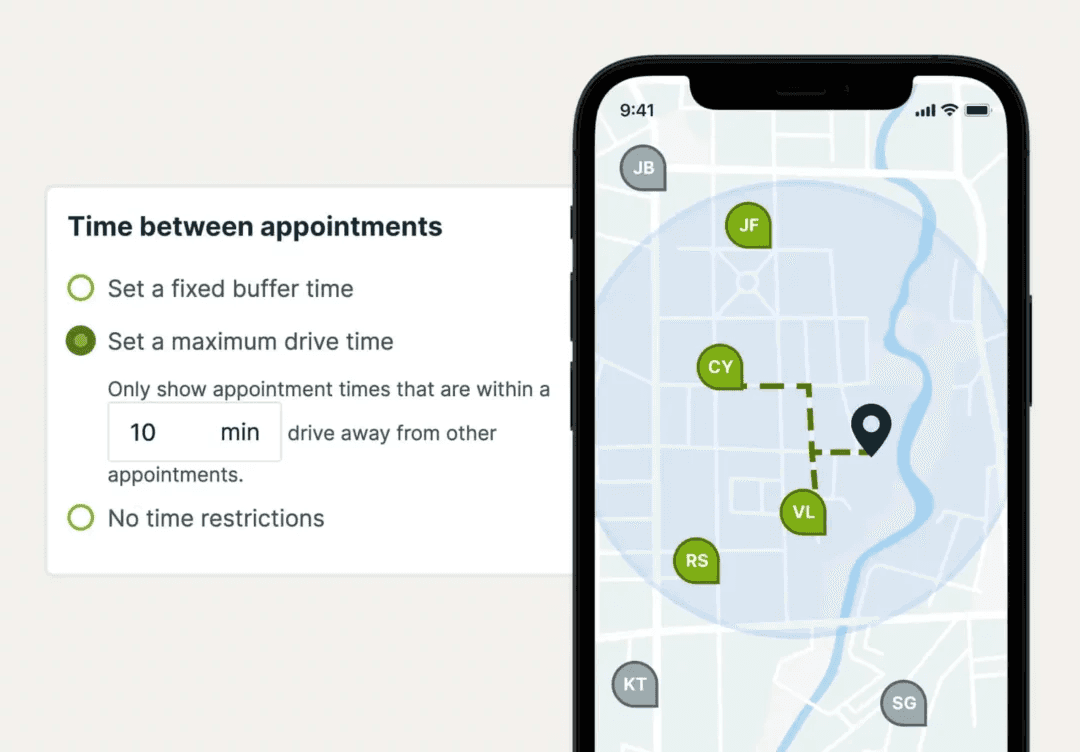
Location-based scheduling (accounting for service areas and drive time between jobs) was one of the more complex pieces, and one we knew from research wouldn't block adoption for most providers. We prioritized it as a fast follow, sequenced after launch based on real usage signal rather than guesswork.
As for post-booking: how confirmations, reminders, and rescheduling worked needed refinement, but getting the core booking flow right mattered more for the initial release. Shipping a focused MVP let us validate the experience with service providers, and use that signal to prioritize what to focus on next.
Location-based considerations
From our research, we learned the importance of efficient routing and location-based scheduling. Location-based scheduling launched as a fast follow, letting service providers define a service area (radius) and maximum drive times directly within the booking flow.

Impact
Significant results across sales, revenue, and partnerships
Our goal was to remove the back-and-forth that made it hard for providers to convert interest into booked jobs.
39%
of users who enabled the feature booked work
+14.2%
increase in average sales price
5x
faster mid-tier plan adoption in target market
Online booking also contributed to a 5% increase in sales win rate, and played a key role in securing a major franchise partnership.
"Jobber's online booking feature saves us between 2–5 hours per week in scheduling time, helping our operations run more smoothly — and our customers love it! Before, we had an inefficient way of scheduling that led to errors and sometimes missed jobs. The feature streamlines our process, has reduced scheduling errors, and makes us appear more professional to our customers. I strongly recommend Jobber's online booking feature to other service providers looking to reduce the stress of scheduling and save more time."
— Residential cleaning service provider